 Tutorial
Archived
Language Coding
Learn to translate Zoo Tycoon 2 animal names and Zoopedia entries using language XML files.
- Zoo Tycoon 2
- Scripting
- Reading time
- 8 min
- Comments
- 0

Learn how to export animated and static models from Blender in NIF format.
by Hendrix
Load your BLEND-file with your finished model.
Click (in the top bar) File > Export > NetImmerse/Gamebyro (.nif & .kf & .emg).
Choose a location and a name for your exported NIF-file.
Make sure all buttons look like that if you want to export an actor (model with animations).
For static objects, activate Stripify Geometries.
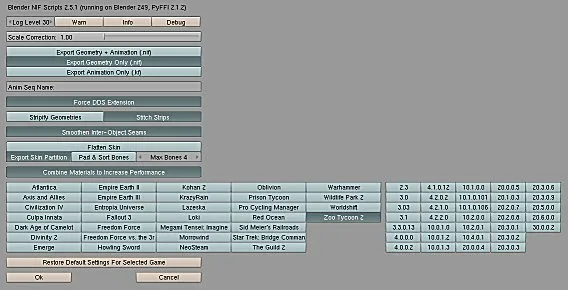
Click OK.
Tutorial
Archived
Learn to translate Zoo Tycoon 2 animal names and Zoopedia entries using language XML files.
 Tutorial
Archived
 Tutorial
Archived
by Ghost
Learn to disable animal cleaning and make animal waste invisible and odorless.
Comments 0
Log in to join the conversation.
No comments yet.